
IFC (Industry Foundation Classes) is the open, neutral exchange format for BIM models: a standard developed by buildingSMART and adopted as an ISO standard, which every serious BIM application can read and write. It is the foundation of what is called openBIM, as opposed to proprietary native formats such as Revit’s RVT or Archicad’s PLN. An IFC faithfully carries geometry, element classification and properties; it carries the parametric logic of the originating software poorly. The rule that follows fits on one line: IFC is a delivery and coordination format, not a working format. That is why a model must always be delivered as two files, the native file and the IFC.
This article is the practical sequel to our comparison Scan-to-BIM: Revit or Archicad?. There, the question was “which software to model in”; here, it is “how to pass the model between the parties without degrading it”.
Already know which deliverable you need? The configurator prices your survey and your model in 2 minutes: native Revit or Archicad, IFC included.
What is an IFC file, in practice?
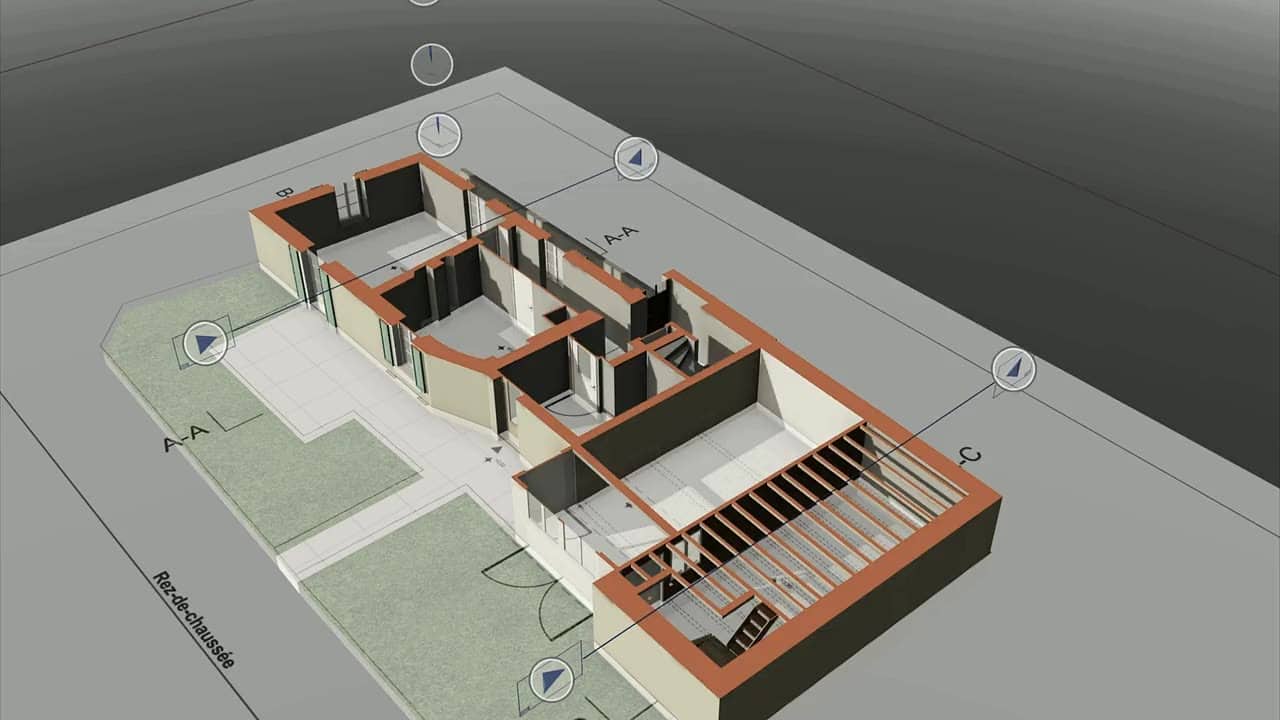
An .ifc file describes a building as a database of objects, not as a drawing. Every element in it is classified according to a shared vocabulary (a wall is an IfcWall, a slab an IfcSlab, a window an IfcWindow), with its geometry, its position in the spatial structure (site → building → storey → space) and its properties organised in structured sets (the property sets). This vocabulary is the same whichever software produced the file: that is what allows an engineer using analysis software to open an architect’s Archicad model, or a municipality to archive a model without depending on a vendor.
The most accurate analogy: IFC is to BIM what PDF is to word processing. Anyone can open it, the content is faithful, you can measure, annotate and extract, but you do not go back into the document to rewrite it comfortably. The analogy has its limits (an IFC remains a queryable database, far richer than an image), but it gives the right intuition about what to expect from it.
openBIM is simply the principle of circulating project information in these open formats: IFC for models, BCF for coordination comments. The alternative, everyone on the same proprietary software, does not hold up in the reality of a Swiss project, where architect, engineers and installers rarely work with the same tools.
Which version of IFC should you use in 2026?
Three versions coexist, and the most recent is not necessarily the right one:
- IFC 2x3 (with its TC1 corrigendum) remains, nearly twenty years after publication, the de facto standard for exchanges: it is the version that almost every application reads and writes in a proven way. If your counterpart does not specify anything, it is the safest choice.
- IFC4, the most mature ISO-standardised version for buildings, corrects and enriches the schema (geometry, properties, building services). Its adoption is growing, driven by recent BIM specifications; software coverage is good today but still uneven from one tool to another.
- IFC 4.3 extends the standard to infrastructure (roads, rail, civil engineering structures). For a building model, it does not concern you yet in practice.
The version does not tell the whole story: an IFC export is also defined by its exchange view (Model View Definition), which specifies which subset of data the file carries, the Coordination View being the most common. In practice: do not ask for “an IFC”, ask for “an IFC 2x3, Coordination View” or whatever your BIM specification requires. It is one line in the order, and it saves a round trip.
What is left of your model after an IFC export?
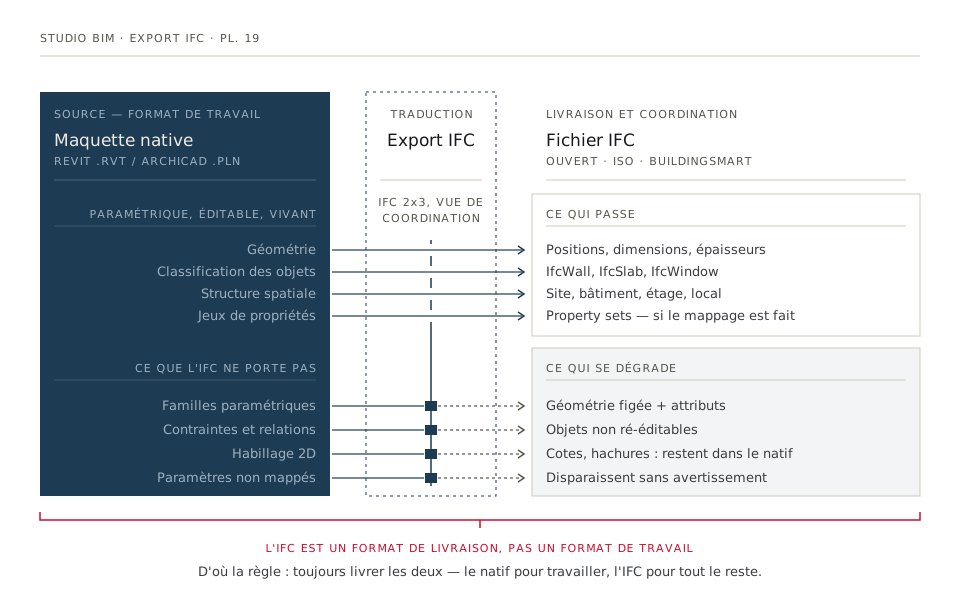
Both Revit and Archicad export buildingSMART-certified IFCs. The issue is not the capability of the software, but the nature of the translation. Here is the honest balance sheet.
What passes through well
- Geometry. Positions, dimensions, thicknesses: the geometric accuracy of the model is preserved. What you measure in the IFC is what you would measure in the native file.
- Classification. A wall exported as an
IfcWallremains identifiable as a wall by every downstream tool: filters, clash detection, quantity take-offs. - Spatial structure. Storeys, spaces, attachment of elements to their level: if the original model is well built, the hierarchy travels.
- Structured properties. Materials, designations, trade-specific parameters, provided the export mapping has been configured, which is precisely the modeller’s job.
What degrades
- Parametric behaviour disappears. A Revit window family, adjustable in width and height, becomes in the IFC a frozen geometry with attributes attached. It can be measured, it can no longer be adjusted. The same fate awaits Archicad’s GDL objects.
- Elements are no longer natively editable. Re-imported into Revit or Archicad, an IFC wall is a “dead” object: you cannot extend it, insert a door into it, or change its build-up with the standard tools.
- 2D does not travel. Dimensions, hatching, line weights, sheet layouts: all of this belongs to the originating software and stays in the native file.
- Poorly mapped data vanishes silently. A parameter not associated with a property set at export raises no warning; it is simply absent from the file. This is the most insidious defect, because it is not visible when the file is opened.
Why IFC is a delivery format, not a working format
This is the central point of this article, and the one that prevents unpleasant surprises: you do not “carry on” an IFC model the way you carry on a native model. An IFC can be viewed, measured, coordinated, checked and archived, all very well. But the team that has to keep the model alive (preliminary design, building permit application, construction) needs elements that are editable with its everyday tools, and those exist only in the native format. Receiving “only the IFC” of a model your practice has to work on means receiving a converted model, with all the symptoms we detailed in the Revit/Archicad comparison: frozen elements, lost parametrics, 2D to redo.
| Native file (RVT / PLN) | IFC | |
|---|---|---|
| Use | Working on the model: modifying, designing, producing drawings | Coordinating, checking, quantifying, archiving |
| Re-editability | Total, with the software’s standard tools | Limited: objects can be viewed but are frozen |
| Longevity | Tied to the vendor and to version upgrades | Open ISO-standardised format, readable in the long term |
| Recipients | The team that keeps the model alive | All the other parties to the project |
The practical conclusion admits no exception: deliver both. That is the Studio BIM delivery standard: every model leaves with its native file, in your version of Revit or Archicad, together with an IFC export, at no extra charge. The full list of deliverables is on the BIM modelling page.
How do you get an IFC export right?
The quality of an IFC is decided upstream of the export, in the construction of the model. Our production rules, applicable as they stand if you export yourself:
- Classify correctly from the modelling stage. Every element must come out in its IFC class: a wall as
IfcWall, not asIfcBuildingElementProxy, the “catch-all” class that neutralises downstream filters and quantity take-offs. - Agree the property sets. Which data must travel (materials, fire resistance, room numbers, and so on)? The answer belongs to the recipient, and it is settled before modelling, ideally in the specification; see our tender template.
- Take care of the spatial structure. One IFC storey per real level, closed and named spaces: that is what makes the file navigable and the areas usable.
- Fix the version and exchange view in writing. IFC 2x3 Coordination View by default, IFC4 if the project’s BIM specification requires it.
- Check in a neutral viewer before delivery. Never in the originating software, which displays its own database and therefore hides export defects. A free IFC viewer is enough to check classes, storeys and properties: the same checks as those in our model acceptance checklist.
Why public procurement requires IFC
If you respond to public calls for tender, you have seen the clause: models to be delivered in IFC format. It is not a formal whim. A municipality that receives a native file depends on a vendor (its licences, its versions, its commercial survival) to read its own data again in ten or twenty years. The open format guarantees three things: software independence (no tenderer is favoured or excluded by its tool), long-term archiving (a publicly documented ISO standard remains readable), and multi-discipline coordination on projects where nobody shares the same software. Swiss public recommendations, the KBOB first among them, push in this direction; we have set out the framework in Is BIM mandatory in Switzerland?.
For a consultant, the consequence is simple: the as-built model produced by the survey must be flawless in its IFC version too, not only in the native file. It is a selection criterion for the scan-to-BIM provider.
Frequently asked questions
What is an IFC file?
An open, neutral exchange format for BIM models, standardised by buildingSMART and adopted as an ISO standard. It describes the building as a database of classified objects (walls, slabs, windows, and so on) with their geometry and properties, readable by every BIM application regardless of which one produced it.
Can an IFC model be edited in Revit or Archicad?
Only marginally. A re-imported IFC opens, can be measured and viewed, but its elements are frozen: they cannot be modified with the software’s standard tools. To keep a model alive (modify it, design in it, produce drawings from it) you need the native file, modelled in the target software, not converted.
Which version of IFC should you ask for?
In the absence of a specific requirement, IFC 2x3 in Coordination View: it is the most widely and most robustly supported version. If the project has a BIM specification that requires IFC4, follow it. Always specify the version and the exchange view in writing in the order.
Should you ask for the native file as well as the IFC?
Yes, systematically, if your team has to work on the model. The IFC covers coordination, checking and archiving; the native file (RVT or PLN) covers day-to-day work. At Studio BIM, both are delivered as standard with every model, at no extra charge.
How do you check an IFC model you have received?
Open it in a neutral IFC viewer, not in your modelling software. Check four points: the elements are in the right classes (little or no IfcBuildingElementProxy), the storey structure matches the real building, the agreed properties are present, and a few check dimensions match the building. Our acceptance checklist sets out the full procedure.
Native + IFC, as standard. Describe your building and get the price of your model (Revit or Archicad, IFC export included) in 2 minutes: studiobim.ch/devis.